Introduction
In 2026, freelancing has become one of the easiest ways to start earning money online. Millions of people around the world are working from home and earning income by offering digital services to clients online. The best part is that you do not need a college degree, years of experience, or expensive equipment to start freelancing.
Many successful freelancers started with zero skills, no clients, and no experience. They learned simple skills online, built their profiles, and slowly started getting work. Today, freelancing allows people to work from anywhere using only a smartphone or laptop and an internet connection.
If you are wondering how to start freelancing with no skills, this complete guide will help you understand everything step-by-step.
What is Freelancing?

Freelancing is a contemporary form of employment in which individuals provide services to clients on their own as opposed to being full-time employees of a business. Through projects, hourly jobs, or monthly contracts, freelancers can work remotely and make money. Because it provides flexibility, freedom, and international prospects, this career path has grown in popularity. Anywhere there is an internet connection, freelancers can work from home.
Today’s digital world offers a wide range of freelance services. Graphic design, content authoring, video editing, data input, site development, social media management, AI-related services, and virtual help are examples of common services. Freelancers are hired by companies and clients worldwide to carry out various activities based on their requirements.
The freedom to select your own clients, pricing, and working hours is one of the main benefits of freelancing. Freelancers can work with several clients concurrently and are not restricted to a single business. Freelancing has emerged as one of the greatest ways to make money online and develop a flexible profession in 2026 due to the rise of remote work and online company.
Some common freelancing services include:
- Graphic Design
- Content Writing
- Video Editing
- Data Entry
- Web Development
- Social Media Management
- AI Services
- Virtual Assistance
Freelancers can choose their own working hours, clients, and prices.
How To Start Freelancing With No Skills?
Yes, absolutely.
Even if you currently have no skills, you can still:
- Learn beginner-friendly skills
- Practice daily
- Create simple portfolio samples
- Start with small projects
- Build experience gradually
The key is consistency and patience.
Why Freelancing is a Great Opportunity in 2026
Due to its freedom, flexibility, and worldwide earning potential, freelancing is expanding quickly in 2026. In order to lower office and operating expenses, many businesses now choose hiring remote workers. Because of this, there is a significant global demand for independent contractors.
1. Remote Work is Increasing

Companies around the world are hiring remote freelancers instead of full-time office employees. This helps businesses save money and gives freelancers more job opportunities.
2. AI Tools Make Work Easier
Modern AI tools help freelancers complete tasks faster and improve productivity. Beginners can also use AI tools to learn skills and work more efficiently.
3. Global Clients
Freelancers can work with international clients from countries like:
- USA
- UK
- Canada
- Australia
This creates better earning opportunities and worldwide connections.
4. Flexible Lifestyle
Freelancers can:
- Work anytime
- Work from anywhere
- Choose their own schedule
This flexibility makes freelancing very attractive.
5. Low Investment
To start freelancing, you only need:
- Internet connection
- Smartphone or laptop
- Basic skills
- Dedication
Best Freelancing Skills for Beginners
It is preferable to start with beginner-friendly freelance abilities if you have no prior expertise. These abilities are highly sought for in 2026 and are simple to acquire. Beginners can progressively get better and begin making money online with consistent practice.
1. Content Writing
If you can write simple English, you can start content writing. Many businesses need writers for:
- Blog posts
- Product descriptions
- Social media captions
- Website content
Content writing is one of the easiest freelancing skills for beginners.
2. Graphic Design
Using free tools like Canva, beginners can create:
- Thumbnails
- Social media posts
- Logos
- Posters
Graphic design is highly popular because businesses always need visual content.
3. Video Editing
Short-form video content is growing rapidly in 2026. Freelancers can edit videos for:
- YouTube
- TikTok
- Instagram Reels
Video editing is a high-income skill with huge future demand.
4. Data Entry
Data entry is simple and beginner-friendly. Common tasks include:
- Copy-paste work
- Excel sheets
- Web research
This skill requires basic computer knowledge and attention to detail.
5. Social Media Management
Businesses need help managing their social media accounts, including:
- Facebook pages
- Instagram accounts
- TikTok content
This skill is ideal for people who enjoy social media platforms.
6. AI Services
AI tools have created many new freelancing opportunities. Beginners can offer:
- AI content creation
- AI image generation
- AI voiceovers
- AI chatbots
How to Learn Skills for Free
In 2026, learning freelance skills does not require expensive classes or a college degree. Thousands of free resources are available online to help beginners learn useful digital skills from home. Anyone interested in how to start freelancing can learn these skills for free through consistent practice, dedication, and daily learning using platforms like YouTube, blogs, and online courses.
Here are the best free learning methods:
YouTube
YouTube is one of the best free learning platforms. It offers thousands of tutorials for beginners in different freelancing fields, including:
- Canva design
- Video editing
- Content writing
- SEO
- Web development
By watching tutorials and practicing step-by-step, beginners can quickly improve their knowledge and skills.
Free Online Courses
Many websites provide high-quality free courses with beginner-friendly lessons. Popular platforms include:
- Coursera
- Udemy Free Courses
- HubSpot Academy
- Google Digital Garage
These platforms help learners understand both basic and advanced concepts.
Practice Daily
Learning without practice is not effective. To improve freelancing skills, beginners should practice consistently every day.
Spend at least:
- 1–2 hours daily practicing
Consistency is more important than speed. Small daily improvements can lead to big results over time.
Best Freelancing Websites for Beginners
1. Fiverr
One of the easiest platforms for beginners
You don’t apply for jobs; instead, you create “gigs” (services you offer)
Clients find you and place orders directly
Best for skills like: graphic design, writing, video editing, voice-over, etc.
Good for beginners because you can start without experience
2. Upwork
A professional freelancing platform
You need to apply for jobs posted by clients
Clients review your profile before hiring
Suitable for long-term and high-paying projects
Competitive, but very powerful once you build a strong profile
3. Freelancer
Similar to Upwork but more beginner-friendly
You can bid on many types of projects
Includes small tasks and quick jobs
Good for gaining early experience
Competition is high, so strong proposals are important
4. PeoplePerHour
Focused on freelance services like marketing, writing, and web work
You can either bid for jobs or set hourly/project-based offers
Good platform for European clients
Less crowded compared to Fiverr and Upwork
5. LinkedIn
Not a freelancing marketplace but very powerful for clients
You can build a professional profile and showcase skills
Clients often contact freelancers directly
Best for networking, B2B work, and long-term opportunities
Posting content regularly increases visibility
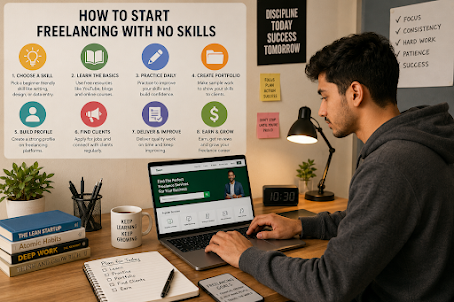
Step-by-Step Guide to Start Freelancing
Step 1: Choose One Skill
Do not try to learn everything at once.
Pick one skill such as:
- Writing
- Canva design
- Video editing
- Data entry
Focus on mastering one skill first.
Step 2: Learn the Basics
Spend 2–4 weeks learning:
- Basic tools
- Workflow
- Client needs
Watch tutorials and practice.
Step 3: Create Sample Work
Clients want proof of your work.
Create:
- Sample logos
- Demo videos
- Example articles
- Social media designs
Even fake practice projects can become portfolio samples.
Step 4: Build Your Freelance Profile
Your profile should include:
Use a clear image.
Simple Description
Explain:
- What service you provide
- How you help clients
Portfolio
Upload your sample work.
Skills
Mention relevant beginner skills.
Step 5: Start Applying for Jobs
At first:
- Apply for small jobs
- Keep prices low
- Focus on getting reviews
Your first client is the hardest.
After that, work becomes easier.
Step 6: Improve Communication
Good communication helps you win clients.
Always:
- Reply quickly
- Be polite
- Understand project requirements
- Deliver work on time
For beginners wondering how to start freelancing, it is one of the best ways to begin earning money online, but it requires patience, consistency, and continuous learning. By focusing on one skill, understanding the basics, and practicing through sample projects, beginners can slowly build confidence and real experience. Creating a strong freelance profile and applying for small jobs helps you enter the market step by step. Although progress may feel slow in the beginning, every project improves your skills and reputation. Good communication, timely delivery, and quality work are essential for gaining client trust and achieving long-term success. With regular improvement and dedication, freelancing can eventually become a stable and rewarding career.
Common Challenges Beginners Face
1. No Clients
This is normal at the beginning.
Keep applying daily.
2. Fear of Starting
Many people wait too long because they think they are not ready.
Start before you feel perfect.
3. Competition
There is competition everywhere.
The solution is:
- Better communication
- Better quality
- Consistency
4. Low Confidence
Confidence grows with practice and experience..
For beginners learning how to start freelancing, getting clients, facing competition, feeling nervous, and having low confidence are very common challenges. These problems are a normal part of the freelancing journey in the beginning. The most important thing is to stay consistent and avoid giving up too early. As you continue improving your skills, applying for jobs daily, and gaining experience, clients will eventually start coming. You do not need to be perfect at the start because taking action is more important than waiting for the perfect moment. Confidence naturally grows through practice, quality work, good communication, and consistent effort. Every successful freelancer once started as a beginner, and long-term success comes from patience, persistence, and continuous learning.
Can You Freelance Using Only a Mobile Phone?
Yes, but it depends on the work type.

You can do:
- Content writing
- Social media management
- Canva design
- Simple video editing
However, a laptop is better for:
- Web development
- Advanced editing
- Faster workflow
Even a mobile phone can be used for freelancing, especially for beginners who are learning how to start freelancing with limited resources. Mobile apps make it possible to handle many simple and popular freelance tasks such as content writing, social media management, basic Canva design, and simple video editing. This makes freelancing more accessible for people who cannot afford a laptop in the beginning. However, mobile freelancing also has some limitations, including slower workflow, smaller screen size, and fewer advanced features. For professional tasks like web development, advanced video editing, or managing large projects, a laptop is far more efficient and productive. It provides better tools, faster performance, and more opportunities to grow your freelancing career. Even so, starting with a smartphone is completely fine, and upgrading to a laptop later can help increase productivity and income. The most important step is to begin with the resources you already have and continue improving over time.
How Long Does It Take to Get the First Client?
For most beginners:
- 1–3 months
Some people get clients faster, while others take longer.
Success depends on:
- Skill quality
- Profile quality
- Daily effort
- Communication
Future of Freelancing in 2026 and Beyond
Freelancing will continue growing because of:
- AI automation
- Remote work culture
- Digital businesses
- Online entrepreneurship
Future high-demand services include:
- AI content creation
- Automation setup
- Video editing
- Personal branding
- Virtual assistance
Freelancing is becoming one of the biggest global career opportunities. It allows people to work from anywhere, choose their own clients, and build independent income streams. Those who learn digital and AI-related skills will have even more opportunities in the future.
Final Thoughts
Starting freelancing with no skills may feel difficult at first, but it is completely possible. Every successful freelancer was once a beginner.
The most important thing is to start learning and taking action consistently.
Remember:
- Choose one skill
- Practice daily
- Build a portfolio
- Apply consistently
- Stay patient
You do not need to be perfect to begin.
In 2026, freelancing offers unlimited opportunities for people who are willing to learn and work hard. If you stay consistent, freelancing can eventually become your full-time income source and give you financial freedom.
Frequently Asked Questions (FAQ)
Yes, many freelancers start with no experience and learn gradually.
2. Which freelancing skill is easiest for beginners?
Content writing, Canva design, and data entry are beginner-friendly.
3. Is freelancing free to start?
Yes, most freelancing platforms are free to join.
4. Can students do freelancing?
Absolutely. Many students earn part-time income through freelancing.
5. Which freelancing website is best for beginners?
Fiverr and Freelancer are excellent for beginners.
6. Do I need a laptop for freelancing?
Not always, but a laptop improves productivity and work quality.
7. Is freelancing a good career in 2026?
Yes, freelancing is growing rapidly and offers global opportunities.