introduction
You can also generate this kind of music completely free without any skills and without money. You can upload it to your social media and YouTube to make money online.
Have you ever dreamed of recording your own song? But because you did not know how to play the guitar, had no music knowledge, or could not afford an expensive studio, that dream was left incomplete? Now do not worry. With the development of technology, the way we make music has completely changed. In today’s digital age, anyone can change their imagination into live music in seconds with the help of a powerful AI music generator app. Among many technologies available in the market, Suno AI has become the most leading and popular name in this field.
Whether you need a dancing pop song, a viral rap, or a sweet melody for a video background—this modern AI music generator app changes your simple text prompt into a complete song with words, music, and voice. In this detailed guide, we will deeply discuss how Suno AI works, what its features are, and how you can make excellent music using it. And do not skip this article even a little bit, because today we are learning step-by-step how to make a song with examples and screenshots, and we will listen to the complete music. That too completely free!”

Why Choose Suno AI for Music Creation?
There are many types of music tools available on the internet. But if you are looking for the easiest and most feature-rich AI music generator app, Suno AI is the first choice. The main reasons are as follows:
Ability to Create a Full Song (Text-to-Song)
In most music-making apps, you have to arrange beats or loops yourself. But as a true and complete AI music generator app, in Suno AI you just need to write a prompt like “a sweet modern song capturing old memories in the rain of Evening”. It writes the lyrics, composes, and sings in a sweet voice to prepare a full track by itself.
Support for Language and Culture
Most international AI tools do not understand languages other than English well. But the biggest feature of this AI music generator app is that it excellently supports any language in the world.
A Blessing for Content Creators
YouTubers, TikTokers, and video editors are always looking for copyright-free background music. By using this AI music generator app, you can prepare a customized background score according to your video’s mood and theme in just 1 minute. Because of this, the fear of copyright strikes ends forever.”

Key Features of Suno AI: A Modern AI Music Generator App
Suno AI constantly brings new updates to give its users a fresh and refined experience. Let’s take a closer look at the main features inside this AI music generator app:
The Magic of v5.5 Preview
The newly introduced v5.5 Preview technology in its audio model has taken audio quality to another level. This version removes unwanted background noise from the song and makes the vocals and instruments extremely clean and crisp. It is hard to find such clear sound in any other AI music generator app currently available in the market.
Options for Simple Mode and Custom Mode
There are two choices based on what kind of song you want to make:
- Simple Mode: In this mode, you only write the mood or genre of the song. This AI music generator app fixes the lyrics and music automatically by itself.
- Custom Mode: If you write the song lyrics yourself, this mode is perfect. Here you can paste your own lyrics and choose which musical instruments (like Flute, Acoustic Guitar) you want to use.
Feature to Make the Song Longer (Extend Feature)
Generally, this AI music generator app prepares an excellent clip or hook of 1 to 2 minutes at first. If you love that tune and want to make it even longer (Full Song), you can press the Extend and Upgrade for full song buttons to add more verses and create a complete 4-5 minute professional song.”

Step-by-Step Guide: How to Use this AI Music Generator App?
You do not need any coding or technical knowledge to run Suno AI. Come, follow the simple steps below to create your own song today:
Step 1: Account Setup and Free Credits
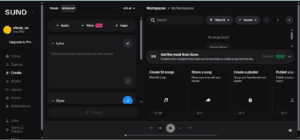
First of all, go to the Suno AI website. Log in there using your Google, Discord, or Microsoft account. If you want, you can make your account using this link. click here This AI music generator app gives free credits to new users, so you can test and make many songs at the beginning without paying money.
Step 2: Decide the Genre and Style of the Song
Now you have arrived at the main place. Now you must have the lyrics of the song. Now where to get the lyrics? Don’t worry, we will write the lyrics with the help of AI tool. For this, first of all, Open ChatGPT and log in.
Now let’s give a prompt to ChatGPT, like: “A beautiful romantic English love song about two people deeply in love who found each other after a long journey. Emotional and heartfelt lyrics, male vocal, modern pop ballad style, soft piano and acoustic guitar, passionate chorus, touching verses, memorable melody, professional studio quality, warm and dreamy atmosphere, suitable for a 2-3 minute song.”
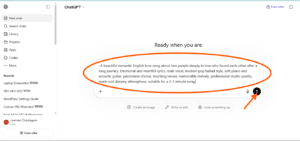
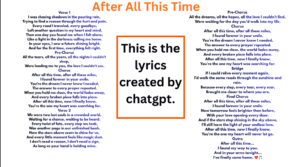
Now ChatGPT has created and given you the complete song lyrics, where the title is given as ‘After All This Time’. You copy that.
Step 3: Generate and Download the Song
Go back to Suno AI and click on the ‘Create’ tab.
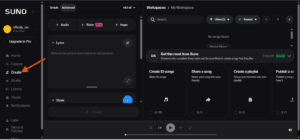
Now paste the copied lyrics inside the lyrics box shown on the screen.
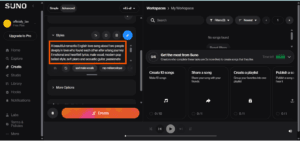
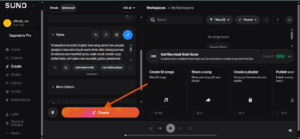
After filling in the details, click on the Create button at the bottom. Since this is an AI music generator app that runs on any smartphone or computer, it will make two songs in different styles based on your prompt within a few seconds.
“Now let’s listen to how the song has turned out!”
Look how beautiful it is. After listening to both songs, you can easily download the one you like in MP3 or video format.